


Running a Shopify store? You know how difficult it is to get your customers attention. We all know that online shoppers scroll through products quickly. So what you need to do is make your product presentation more unique and fun. That’s why you should use flipbooks for your store. Flipbook turns your ordinary product catalogs, brochures, or lookbooks into beautiful digital books.
When shoppers visit a store, they pick up products, flip through brochures or browse catalogs. A flipbook recreates this feeling online. Shoppers can turn pages, zoom in on product images, watch embedded videos and click on links. This experience can make customers more confident about their purchasing decisions. As a result you can increase your sales and customer satisfaction.
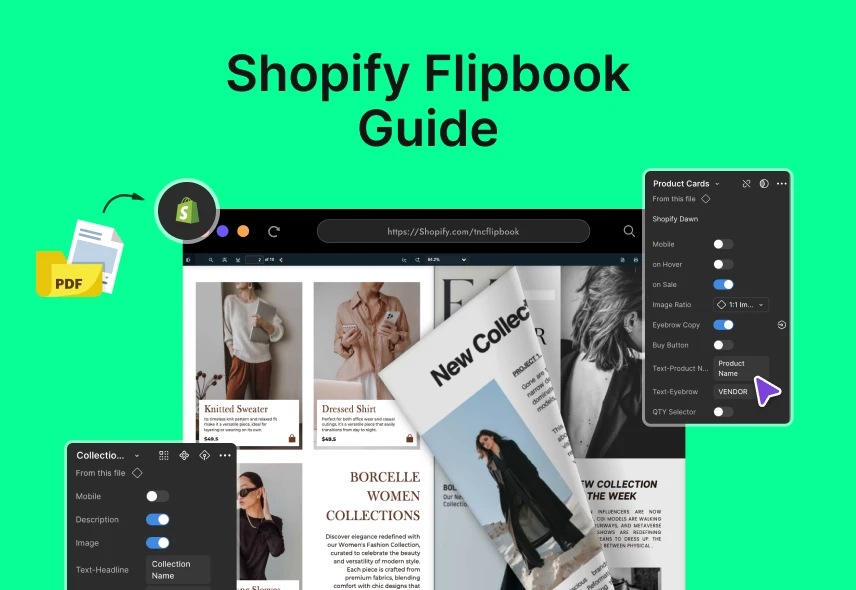
In this guide, I will show you what Shopify Flipbook is and how it can increase sales on your Shopify store.
What is Shopify Flipbook?
A Shopify flipbook is a digital version of a printed catalog or brochure, but it’s much more dynamic. Instead of just clicking through simple pages or pictures, customers can flip through it like a real magazine. It offers smooth page turns and even sound effects to make browsing fun.
Flipbooks can include photos, product details, videos, and clickable links all in one place. Your customers will get all the information they need. This informative experience keeps visitors interested longer. Click here to see an example of a flipbook.
Why Flipbook Helps You Sell More on Shopify
Flipbooks make your products look amazing. Customers can flip through pages and see beautiful content. You can add videos and links to your products. This makes shopping more fun and easy. When shopping is fun, people buy more. Flipbooks help you sell more by making your store more exciting.
Flipbooks also save you a lot of time and money. You don’t need to pay for printing or shipping a physical catalog. If you want to update your prices or add a new product, you can do it instantly. This is great for sales and marketing teams. They can quickly change the catalog to match new sales or promotions. For example, if you sell clothes, you can create a flipbook just for your “Summer Sale” collection and update it with new items every week without extra cost.
Flipbooks give you useful data about your customers. You can see which pages they visit most, and what links they click. It helps you know what they like. For example, if many people click on your new product page for jackets, you know to highlight those jackets more in your emails and social media. Using this data helps you make smarter choices and sell more of what your customers want.
How to Create & Add a Flipbook to Your Shopify Store
You will create a great flipbook when you choose a perfect app that integrates with Shopify. Many apps allow you to easily upload your existing PDF catalogs or images and convert them into interactive flipbooks with minimal setup. Here is a step-by-step guide to help you get started:
Step 1: Choose a Flipbook App
First thing you need to do is find the right app for your shopify store. There are many great options available. Famous shopify flipbook apps are TNC PDF FlipBook, PDF Flipbook Pro, and Flook. Analyze and take some time to get a perfect app. Look for an app that’s easy to use and offers the features you need. Here, I have chosen the TNC PDF FlipBook app for its functionality and perfection.
Step 2: Create Your Content
You can create your flipbook in two ways: design it from scratch with the app’s tools or upload a PDF you already have. If you make a new catalog, use sharp images and simple, clear product descriptions. Keep your store’s colors and fonts to make it look professional.
Step 3: How to Create a Flipbook?
You can quickly create and add flipbooks to your Shopify store using the TNC PDF Flipbook app. This app offers different subscription plans to choose from. After installing it, the app turns your PDFs into flipbooks. You can also turn images into flipbooks. You will get a dashboard to manage them. Your existing PDF links will automatically change into flipbooks, and you will receive an embed code to add them to your store.
Step 4: Customize Your Flipbook
TNC PDF Flipbook app ensures many customization options to showcase your flipbook. You can choose primary, secondary and text colors. You can create visitors with custom background images. You can also embed or show flipbooks as a pop-up or link. You also get six themes and three icon sizes to customize your flipbook. It includes password-protected documents. Users can fill out forms and follow links directly within the flipbook.
Step 5: Make it Interactive
Once your flipbook is ready, you need to embed it in your Shopify store. Most apps make this easy by providing a simple embed code. You can paste into a page or a dedicated app block. You can display it on your homepage, a dedicated “Catalog” page or even on a collection page. Don’t forget to share your new flipbook with your audience! You can:
- Email Campaign: Send visitors a link to your new interactive catalog.
- Share on Social Media: Post about your new digital lookbook on social sites.
- Use it in your Email Signature: A small link to your flipbook in your email signature can increase traffic.
Design Tips to Make Your Flipbook Effective
Use clear images to show your products well. Write short and simple descriptions that tell customers what they need to know. Keep the same colors and fonts as your brand so the flipbook feels familiar. Add clickable links that take customers straight to product pages to help them buy faster.
Make sure your flipbook looks good but loads fast. Start with a nice cover page that catches attention and makes people want to look inside. Combining great pictures, simple navigation, and quick loading will help your flipbook give shoppers a better experience and increase your sales.

Marketing Your Flipbook to Reach More Customers
Making a flipbook is just the first step. You need to share and promote it in different places. Put your flipbook in a visible spot on your Shopify store, like the homepage, a special catalog page, or on product pages. Share it on social media platforms where people love to see pictures and videos.
Use email too. Include the flipbook in your newsletters or special email offers to show new products or sales. Flipbooks look great and get more clicks than regular emails. You can also work with influencers or bloggers who can share your flipbook with their followers. It’s helping you reach even more people.
How Flipbooks Can Directly Increase Your Sales
Make Shopping Easy
A good flipbook has links you can click on for every product. When a customer sees a product they like, they can click it. This takes them right to the product page and makes buying easy. When it’s easy to buy, more people will do it.
Create a Better Experience
Flipbooks are fun to use. You can add photos, videos that show how a product works. You can also add pop-up pictures to show a product from all sides. This gives customers more information, so they feel sure about buying.
Help You Sell More
A flipbook shows your whole collection. Instead of seeing just one item, customers see everything you sell. It makes them want to browse and find other things. For example, a customer might come for a jacket but then see a matching hat and gloves. This helps you sell more items in one order.
Give You Valuable Information
You can see which pages people look at the most. This tells you what your customers like. You can use this information to improve your products and ads, which helps you sell even more.
Build Trust
A professional flipbook shows that you care about your brand. It makes your company look good. Customers are more willing to spend money with a brand they trust. This trust can turn a new buyer into a regular customer.
Final Thoughts
Flipbooks on your Shopify store are a smart way to increase your sales. It makes your store look professional and helps customers see your products clearly. When customers spend more time exploring, they feel more confident about buying from you. You can share your flipbooks on social media, email, and other places to attract more people to your store.
Flipbooks also give you useful information about what your customers like. Start using flipbooks today to make your product catalogs fresh and exciting. Give your customers a better way to shop and watch your Shopify store grow. For more information about flipbooks, visit here.







0 Comments