

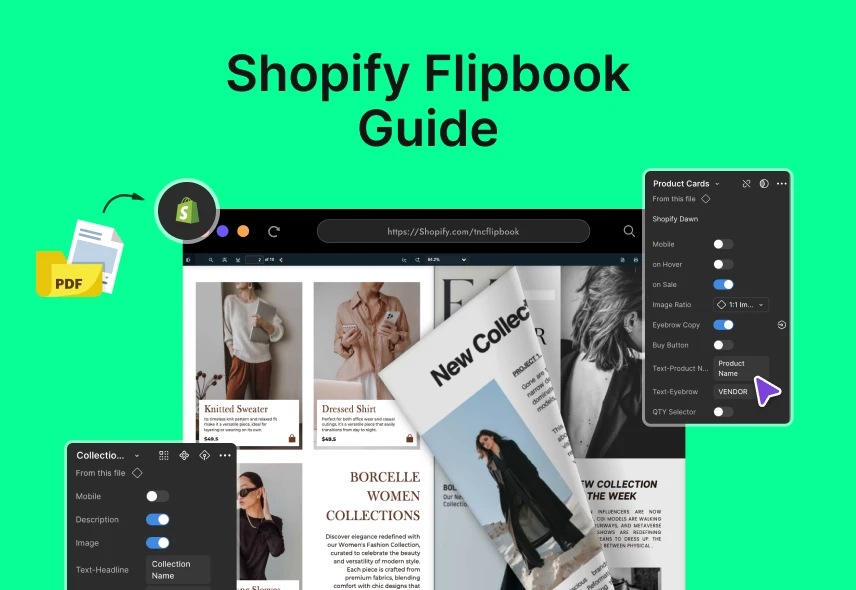
Creating an engaging shopping experience on your Shopify store depends on how you present your products. If you want to make your Shopify product catalogs more engaging, a flipbook is a smart choice. A Shopify flipbook lets your customers flip through pages just like a real book. You can turn any regular PDF into an interactive flipbook quickly and easily.
You worked hard to make a nice lookbook, brochure or gift guide. But when you upload it as a PDF, it doesn’t work well. It’s hard to see on the phone, you can’t track it and your customers have to leave your store to open it. In this guide, you will learn exactly how to convert your PDF files into attractive flipbooks and embed them into your Shopify store in just minutes.
What is a Shopify Flipbook?
A Shopify flipbook is an online digital booklet or catalog with animated page-flips. Shoppers see smooth flipping animation that makes browsing fun and engaging. Flipbooks are fully interactive, allowing customers to zoom in, click links, and navigate easily without downloading anything.
Flipbooks deliver a richer user experience than traditional PDFs. A Shopify flipbook keeps visitors engaged for longer and increases their chances of making a purchase. In the next section I will show you why your store needs a flipbook.
Why Your Shopify Store Needs a Flipbook
We create a chart on the comparison of PDF and flipbook. First, let’s understand why your old PDF is a problem. Then, let’s see why your store needs a flipbook:
| Aspect | The Problem with Your PDF | The Power of a Flipbook | Why It Matters for Your Shopify Store |
| Interactivity | PDFs are static and do not respond or move. | Flipbooks offer smooth page-flip animations, swipes, and interactive navigation. | Creates a fun, engaging browsing experience that keeps customers interested. |
| Mobile Friendliness | Not mobile-friendly; customers must zoom and pinch manually. | Responsive design adapts perfectly to phones, tablets, and desktops. | Ensures users can easily browse your catalog on any device, reducing frustration. |
| Shopping Convenience | Customers cannot click products inside PDFs, and must return to the store to search. | Embedded clickable buttons take customers directly to product pages for easy buying. | Streamlines the buying process, increasing sales and reducing drop-offs. |
| User Experience | Slow to load, no multimedia support. | Supports rich media like videos, audio, and links for deeper engagement. | Makes your store feel modern and dynamic, improving brand perception. |
| Data and Tracking | No way to track user interaction or page views. | Provides analytics showing which pages and products get the most views and clicks. | Helps you understand customer interests and optimize your marketing. |
| Customization | Limited or no customization options beyond PDF layout. | Customize colors, backgrounds, navigation controls, and layouts to match branding. | Strengthens brand identity and creates a seamless shopping experience. |
| SEO Impact | PDFs are generally ignored by search engines due to limited crawlability. | Flipbooks with optimized text and links can improve SEO and drive organic traffic. | Increases your store’s online visibility and attracts more visitors. |
| Loading Speed | PDFs can be large and slow to download, especially on mobile. | Flipbooks use optimized file formats and progressive loading for fast access. | Keeps bounce rates low by delivering content quickly. |
| Sharing & Distribution | PDFs are hard to share and often require downloads. | Flipbooks share easily via URLs and social media, no downloads needed. | Expands audience reach by making catalogs easy to share and view anywhere. |
| Customer Engagement | In passive experience, customers quickly lose interest. | Interactive content encourages longer session time and repeat visits. | Boosts sales by keeping customers engaged and showcasing more products effectively. |
Summary: Switching from PDFs to flipbooks can multiply your sales by 3 to 5 times with the same number of visitors. This simple change improves how customers interact, find products, and buy directly from your catalog. Investing in flipbooks means more revenue and happier customers.
Step-by-Step: Create a Shopify Flipbook From Your PDF
This is your step-by-step guide to creating a Shopify flipbook from PDF. Now, follow these steps, and you will have a flipbook in minutes.
Step 1: Prepare Your PDF Checklist
Before you start, you need a good PDF file.
- Use High-Quality Images: Make sure your photos are clear and sharp. Do not use blurry images.
- Keep It Light: The file size should be small. A good size is less than 50 MB. You can use a free online tool to make your PDF smaller.
- Choose a Layout: A horizontal, landscape layout is best. It looks good on a computer screen.
- Design for Mobile: Use a clean font that is easy to read. Do not put too much text on one page.
Step 2: Get the Right App
Shopify doesn’t have built-in flipbook features. Choose a third-party app to make flipbooks easily. Look for an app with these features:
| Feature | Why It Matters |
| Easy Upload | You want to just drag and drop your PDF to create a flipbook easily. |
| Shopping Cart Button | This is a must-have. It lets customers buy products directly from the flipbook for quick purchases. |
| Analytics | You need to see which pages and products your customers like the most to improve your marketing. |
| Good Reviews | Positive feedback from other users shows the app is reliable and effective. |
| Free Plan or Trial | You can try the app for free before deciding to pay, reducing the risk of investment. |
Based on the analysis, here are some examples of trending Shopify Flipbook apps:
TNC PDF FlipBook: Easy integration with Shopify, convert PDFs, customize branding.
FlipHTML5: Cloud-based with many themes and interactive elements.
FlippingBook: Sales-focused, secure flipbooks with multimedia support.
Simplebooklet: User-friendly with analytics and embedding options.
Click here to see which Shopify FlipBook app is right for you.
Step 3: Create Your Flipbook
Make sure your PDF is well-formatted with clear images and product descriptions to maximize impact. Let’s make the flipbook.
- Go to the App: Find the flipbook app in your Shopify admin. Click “Create New.” A new page will open.
- Upload Your PDF: Click the upload button. Find your PDF file on your computer. The app will start working.
- Wait a Few Moments: The app will automatically convert it into an interactive flipbook within seconds.
Step 4: Customize Your Flipbook Design
- Add a cover page with logo and title.
- Adjust background and text colors.
- Choose flip animation style.
- Insert clickable links, videos, or buttons where relevant.
- Pick pages to hide or reorder for a smooth flow.
Step 5: Make It Shoppable
- Most important part: Now you will add buttons and links to your flipbook.
- Open the Editor: In the app, click “Edit Flipbook.”
- Go to a Page: Find a page with a product on it.
- Draw a Box: Click and drag a box over your product photo.
- Add a Link: You can also add a link that puts the product directly into the customer’s shopping cart. You can add links to videos, other pages on your website, your social media pages and more.
After customization, the app provides an embed code. This code will display your flipbook inside your Shopify pages.
Step 6: Embed Flipbook on Your Shopify Store
- Log in to the Shopify admin.
- Go to Online Store > Pages or select a specific product page.
- Open the HTML editor for the content area.
- Paste the flipbook embed code where you want it to appear.
- Save and preview your page to see the interactive flipbook live.
Repeat embedding on other pages as needed for catalogs, lookbooks, or brochures. So here’s how quickly you can create a Shopify flipbook.
Advanced Tips for Effective Shopify Flipbooks
Simple SEO Plan
To help people find your flipbook on Google, do three things: Give it a clear name like “Summer-Shoes-Lookbook” instead of “catalog.pdf.” Write a simple description using words your customers search for. Share your flipbook a lot. The more people see it, the higher Google will rank it.
Analytics for Action
Your flipbook app shows you useful info to help sell more. See which pages people like most and put your best products there. Find out which products get the most clicks and promote them. You can also learn where your viewers are from to help with your ads. Use this info to sell better and grow your store.
Marketing Made Easy
Social Media: Create a short video that shows pages of your flipbook. Post it on your social media. Put a link to the flipbook in your bio.
Email Marketing: Send an email to your customer list. The subject should be like this: “Our New Lookbook Is Here!” Add a big button that links to the flipbook.
Homepage Banner: Put a simple banner on your Shopify homepage. It should say, “Shop Our New Lookbook.” This will get a lot of clicks.
Common Problems & Simple Solutions
Do not worry if something goes wrong. Here are the most common problems and their easy fixes.
| Problem | Simple Fix |
| My flipbook looks blurry. | Use a high-quality PDF file. Make sure your file is at least 300 DPI. |
| My flipbook loads slowly. | Your PDF file is too large. Make it smaller before uploading. |
| My links are not working. | Check your links carefully. Make sure they start with https:// and are copied right. |
| The flipbook does not fit the page. | Try a different embed option or contact the app’s support team for help. |
Final Thoughts
You now have a complete guide. You know what it can do for you and how to make it. A static PDF is a missed opportunity. This is a dead end for your customers and a waste of your beautiful content. On the other hand, an interactive flipbook is a sales tool that works for you 24/7. The process is simple. You can turn your PDF into a shoppable asset in minutes.
A perfect flipbook makes it easy and fun for customers to buy products. Start using a dynamic flipbook. Your store deserves it. Start flipping and start selling. If you want to read more blogs, stay connected with us.
FAQ: Shopify Flipbook Guide
1. How do I make a flipbook from a PDF?
Upload your PDF to a flipbook app, customize it, then embed it on your Shopify store.
2. Will it work on mobile devices?
Yes, flipbooks adjust automatically for phones, tablets, and desktops.
3. Can customers buy directly from the flipbook?
Yes, you can add shopping buttons so buyers can purchase straight from the flipbook pages.
4. Will a flipbook slow down my website?
A good flipbook app is built to be fast and lightweight. If your original PDF file is very large, it might load more slowly. To avoid this, make sure you compress your PDF and optimize your images before you upload them.
5. What if my flipbook is blurry or slow?
Use high-resolution PDFs (300 DPI+) and compress large files for faster loading.
6. What kind of content can I turn into a flipbook?
You can turn any PDF into a flipbook. Common examples include product catalogs, fashion lookbooks, seasonal gift guides, restaurant menus, how-to guides, and company brochures.
7. Which Shopify flipbook is the best?
It depends on various aspects. But according to most users, we recommend a convenient solution, and that is TNC PDF FlipBook.








0 Comments