


Shopify businesses constantly seek innovative ways to engage customers and drive sales. One such strategy is using interactive elements in your Shopify store. Flipbooks offer a perfect way to showcase your products or services, transforming static PDFs or images into a dynamic, page-turning experience. If you’re a Shopify store owner to improve your customer experience and increase conversions, finding the right Flipbook app is important.
From displaying product catalogs and marketing materials to providing interactive customer support, Flipbook apps can be a powerful option. Converting your shopify content into a flipbook is surprisingly easy. Whether showcasing your unique products, sharing your latest product stories, or providing information about your Shopify business, flipbooks offer engaging ways to connect with your visitors.
However, with so many flipbook apps available in the Shopify app store, finding the one that best suits your needs can be challenging. In this blog post, we’ll guide you through finding the best flipbook app for your Shopify store.
How to Find the Best Flipbook App For Shopify?
You need a perfect app to create flipbooks for your Shopify store. Whenever choosing a perfect Flipbook app for your Shopify store, consider its cost, features, user-friendliness, customer support, reviews, documentation, and video tutorials. It can help you make an informed decision. According to our research, TNC PDF FlipBook is the perfect flipbook app for Shopify stores. TNC PDF FlipBook is available in the Shopify App Store. It offers an ideal conversion from PDF or image to interactive flipbook for your Shopify store.
Core Features of TNC PDF FlipBook
Password-Protected PDF: If you have a password-protected PDF, it will ask for the password before showing the PDF. If the PDF contains a fillable form, visitors can fill it out. All the links inside the PDF will be clickable and will work perfectly.

Embed Protection: You can protect your links from sharing on other websites. There is a protection option that allows your PDF to be embedded only on your website.

Toolbar and Icon Size: PDF FlipBook offers different toolbar options. The first is a full-width position at the top and a full-width position at the bottom, providing a full toolbar that spans the screen’s width. There is also a top-center position, strategically placing the toolbar at the top center of the screen. You also get three icon sizes: small, medium, and large.

Customizable: Flipbook is very easy to customize. You can show or hide any toolbar options. You will get many themes, colors, and customized background images that fit your needs. You can also embed or show flipbooks as a popup or Link.

Six Different Theme Colors: You also get six colors to customize your flipbook. They are: 1. Midnight Calm 2. Material Blue 3. Lewis Purple 4. Sea Green 5. Aqua White 6. Smart Red.

Responsiveness: Its responsive design easily adapts to different screen sizes, orientations, and resolutions, ensuring your flipbook looks and works on any device. You can ensure your audience can enjoy your interactive content across all devices.

Showcase Your Flipbook in Different Ways
TNC PDF Flipbook has three different modes. You can display your content in various ways. Let’s explore now:
FlipBook Mode: In Flipbook mode, you will get a digital reading experience and a flip-through sensation like the pages of an actual book. It completely bridges the gap between the traditional and digital worlds.

Vertical Scrolling Mode: Visitors can smoothly scroll through the PDF document from top to bottom. This user-friendly option offers seamless flow, making it ideal for those seeking a comprehensive view of document contents.
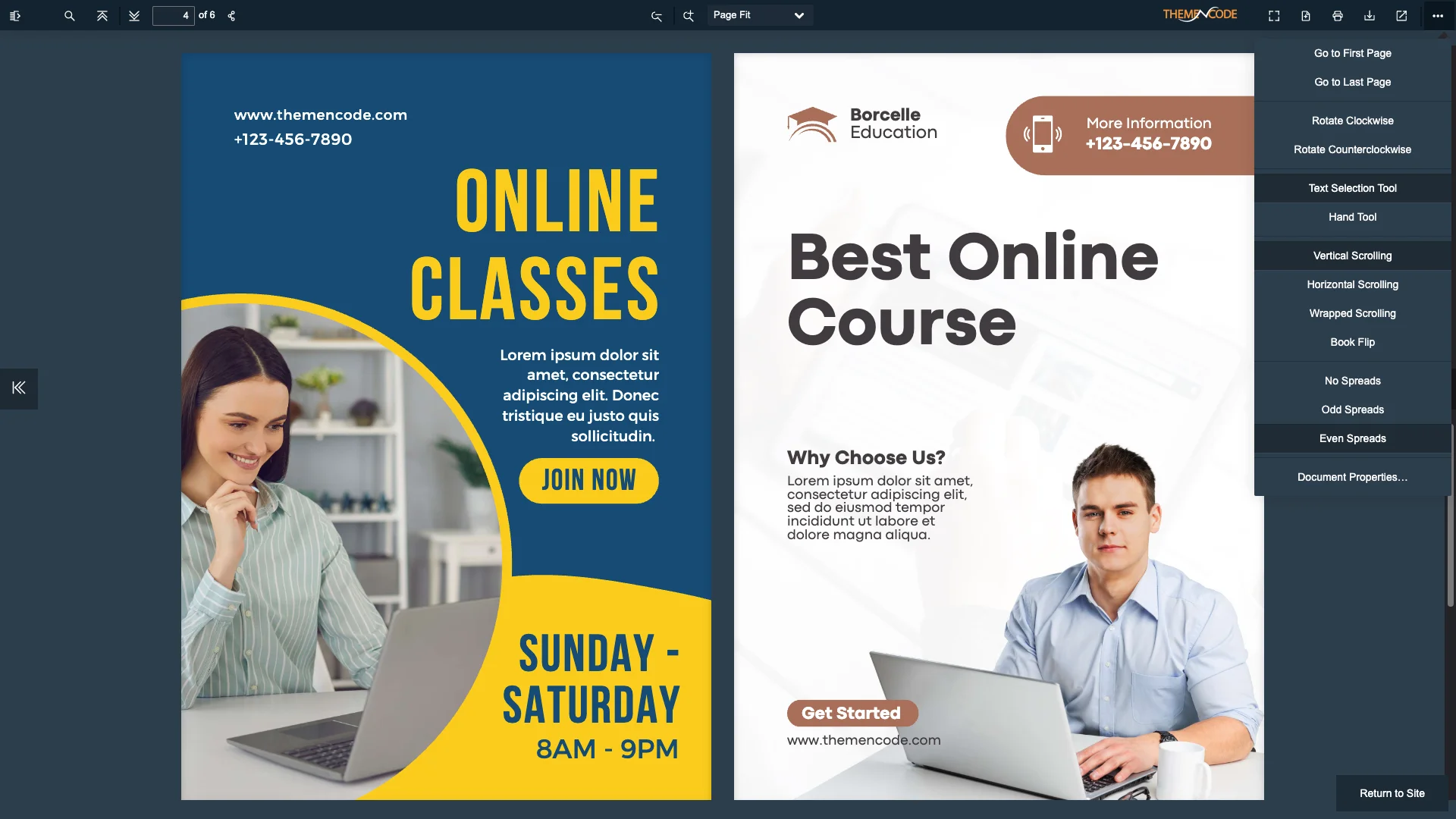
Horizontal Scrolling Mode: This mode allows the PDF file to be scrolled from left to right. This feature provides a new and dynamic view and is convenient for side-by-side viewing.

Read This Blog: Introducing TNC PDF FlipBook | Turn Your Shopify Store PDFs into Stylish and Interactive FlipBooks
How to Make a Flipbook Using TNC PDF FlipBook?
You must integrate the TNC PDF Flipbook app in your Shopify store to turn all your PDFs and images into flipbooks. You need to register or choose your preferred plan for the TNC PDF Flipbook. You will find many plans for this Shopify app. After selecting the plan of your choice, you will get your dashboard. After that, your existing PDF links will be automatically converted to Flipbook.
TNC PDF FlipBook allows you to customize the look and feel of your flipbook. You can also easily convert images into a flipbook. To do this, go to the Image to Flipbook tab. After that, upload and select the photos you want to display and make a fantastic flipbook with them. In this tab, you will find settings like Page Size, Margins, Page Layout, Image Sizing, and Actions. After finishing all this, click Convert PDF, and you are done.

You can personalize your flipbook according to your preferences. You can choose the background color, add a cover page, and even include a title and description. Whether you want to create interactive brochures, digital magazines, or product catalogs for your Shopify store, this is the easiest way to make a flipbook for your shopify store without any hassle.
Read this blog for more details, “How to Make a FlipBook from Images.”
Why Should You Use TNC PDF FlipBook?
Many reasons and benefits make it a valuable choice for many individuals and businesses. Here are some top reasons you might need flipbooks for your Shopify store.
- Improve Engagement: Flipbook allows users to flip pages like reading a physical book. This will engage readers and encourage them to explore your content thoroughly.
- Marketing Benefits: You can create brochures, catalogs, product guides, and more, making them visually appealing and shareable on websites, social media, and email campaigns.
- Content Modernization: Converting PDFs to flipbooks is a modern and innovative way to present your content. It can help your website stand out and showcase your commitment to delivering a top-notch user experience.
- Compatibility: Whether customers browse your Shopify store on a desktop computer, tablet, smartphone, or any other device, this app ensures a consistent and rich experience.
- User Experience: Ultimately, flipbooks enhance the overall user experience on your website. They make your content more enjoyable, increasing user satisfaction and retention.
- Lead Captures: Your visitors will enjoy flipping through your flipbooks, which can lead to higher conversion rates and increased sales.
- Dedicated Customer Support: After getting TNC PDF FlipBook for your Shopify store, their dedicated support team will help you with any issues.
Watch this video tutorial for more details
Conclusion
By carefully considering the points described in this guide, you can confidently select the best Flipbook app to improve your Shopify store. When deciding, remember to prioritize your specific needs, target audience, budget, and desired features. Investing in a high-quality Flipbook app can highlight the Shopify store.
With TNC PDF FlipBook, you can easily create and embed flipbooks in your store, transforming your content into a dynamic and engaging format. A perfect flipbook is more than just a document. It is a valuable marketing tool to help you achieve your business goals.
Apart from this, If you want to read more blogs, visit here.







0 Comments